
Beautiful backtests. Screenshots of perfect months. Promises of a rich future.
Aren’t you also sick and tired of the fake reviews, and the deepfake videos of “super successful traders” driving Ferraris and flashing fake Rolex watches — all just to convince you that their EA will make you rich?
MasterTrader takes a different road: a very clever and sophisticated EA for MetaTrader 5, built on capital protection, layered safeguards and clear rules — with results you can actually judge on your own account, with your own eyes.
Most sales pages are built to make you feel something — not to tell you something. You know the pattern.
A curve that only goes up. Tuned until the past looks flawless — and says nothing about what happens next.
Hand-picked winning days, demo accounts passed off as real. What you don’t see is what matters.
“Financial freedom in 90 days.” Not a word about drawdown, risk, or what the market does when it turns.
It’s easy to make a hedging EA bank all of its winners. The result looks beautiful. What they don’t show you is that the open drawdown is just as big. Close every open trade and the real result is zero — or negative.
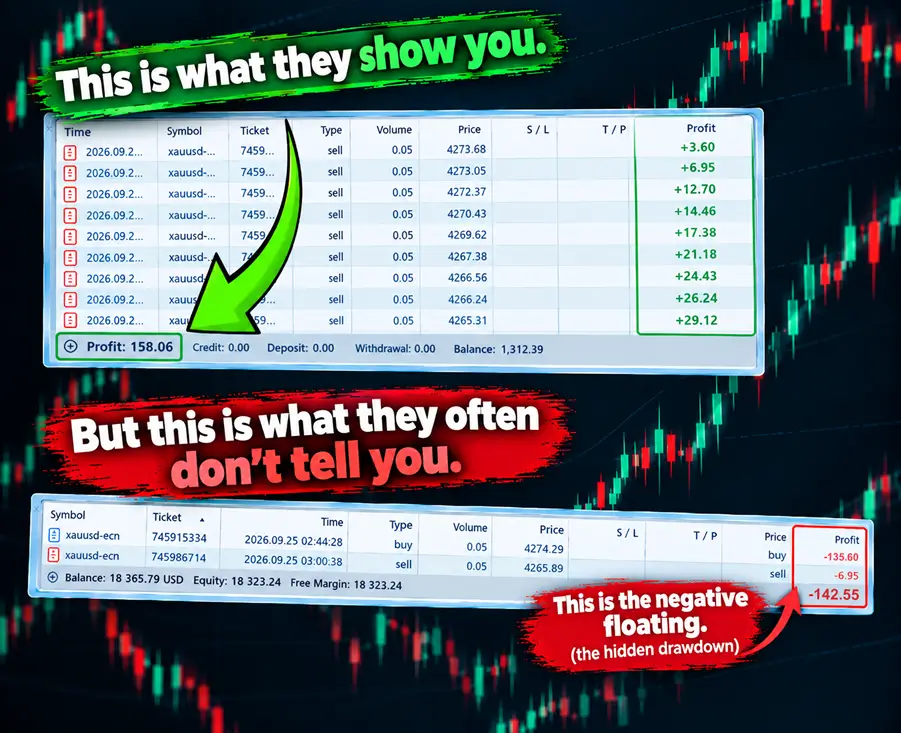
Sound familiar? You deserve better than a sales pitch.
No talk of easy money. A trading engine designed around capital protection: rules you can read, limits you set and a live view of everything it does.
A live panel on your chart shows the state of every safeguard, the running position and the license status. What it does, you see.
Kill switch, margin guard, a cap on trades per side and a weekly trading schedule — safeguards layered on safeguards. You decide how much risk is too much; the EA enforces it.
It runs on your own MetaTrader 5 account, at your own broker. Your funds never leave your broker — we only check that your license is valid.
Pay once, log in with your email and register your MT5 account numbers — up to 3 per license.
Load MasterTrader in MetaTrader 5 together with the included SET file for XAUUSD on M15. Then fine-tune your limits if you like: lot size, kill switch, trading hours, margin guard.
Watch the panel, keep your risk where you put it, and judge the results on your own account — not on a screenshot.

This is the panel MasterTrader draws on your MetaTrader 5 chart. Drag it, minimize it, park it where you like.
Buy Stop and Sell Stop orders that follow price, with spacing you configure — wider at the start, tighter as a sequence builds.
A loss limit that stops a bad stretch from becoming a disaster. Fixed, or scaled to your account balance.
An overall profit target (fixed or a percentage of balance) plus trailing profit protection based on candles, fractals or pips.
Position size that scales with your balance — or keep it fixed. Your account, your call.
A weekly schedule with two time windows per day, so the EA only trades when you want it to.
An optional built-in trend filter, based on swing structure — no extra indicator needed.
New orders are held back when your margin level drops below the threshold you set. The safety net stays on.
Automatically pauses trading around high-impact news that can potentially affect the gold price, with a window (in minutes) you set before and after each release — so the grid isn’t caught wide open during the sharpest, least predictable moves.
Logs the worst floating loss your open positions actually reached, every single day — not just what got realized. The “hidden drawdown” above isn’t just a concept: you get a daily record of it, saved to file, and it is shown clearly on your chart in its own panel — nothing hidden from you.
MasterTrader has a lot of settings — so it ships with a ready-made SET file for XAUUSD on M15, plus recommendations on which brokers to use. Load it and you’re up and running, without first having to study which settings work best on which broker.

You shouldn’t have to choose between babysitting every trade and walking away and hoping for the best. Soft Disable is the middle option: one click, and MasterTrader lets itself out cleanly — at work, mid-errand, or simply done for the day.
We won’t ask you to believe a number on a web page.
“Soft Disable is genius. It means that when I’m at work and can’t watch every trade, I can just flip it on and the EA closes everything out cleanly — at breakeven or better — without me having to babysit it.”
“The kill switch and margin guard are what convinced me. I get to set my own worst-case number, and it simply isn’t possible for the EA to lose more than that — no matter what the market does overnight.”
“What stood out to me is how little there is to babysit. The News Filter is built to pause itself around high-impact news, and the drawdown meter logs every day automatically — nothing for me to remember to do by hand.”
The introductory price has ended — this is the regular price.
You’ll pick your payment currency at checkout.
Trade with VT Markets? Get MasterTrader for $250.
No. Trading carries risk and no Expert Advisor can promise profit. MasterTrader is a tool with rules and limits; what you get out of it depends on your settings, your broker, market conditions and how much risk you accept.
Yes — with one huge difference. Its grid is fenced in on every side by protection layers: a kill switch, a margin guard, a cap on trades per side and a trading schedule. That is what keeps the grid inside its banks instead of letting the open drawdown run away from you — the exact thing the “hidden drawdown” above is about. Even so, trading carries risk and nothing can guarantee against loss.
One license covers up to 3 MT5 accounts. You register the account numbers in your customer area after purchase and can manage them there.
No. MasterTrader has many settings, which is why it ships with a ready-made SET file for XAUUSD on M15 and recommendations on which brokers to use. Load the file and you can get started right away — no need to first study which settings work best on which broker. You can still adjust everything to your own risk appetite.
No. You pay once and the license is yours for life.
MasterTrader runs on MetaTrader 5, and broker recommendations come with it. Real-world behaviour still depends on your broker’s spreads, execution and stop levels — so always test on a demo account first and look at how it behaves before you go live.
Your funds stay with your broker — we never hold or touch them. To check your license, MasterTrader only sends your account number and server name to our license server.
It could work, but only if you set very strict time windows. That’s because most prop firms cap the number of server calls per day — FTMO, for example, allows 2,000. A server call is any action sent to the server: opening a trade, placing a stop order, adjusting a stop level, setting a Stop Loss, closing a trade, and so on.
MasterTrader works with trailing stop orders and a trailing Stop Loss that locks in profit as a trade moves in your favour, so it reaches that 2,000-call limit fast. We tested this on FTMO ourselves and had a hyperactivity warning email from them within an hour.
So yes, in theory it could work, but only with heavy restrictions on how often it is allowed to act — which is why we do not recommend using MasterTrader on a prop-firm account.
No, and we’d rather tell you that up front than let you find out the hard way. MasterTrader trades gold, one of the most volatile markets there is. It can produce genuinely satisfying gains — but it can also produce dramatic losses if your trades don’t get enough breathing room. How much breathing room you have is set directly by your account balance, and $500–$1,000 is simply too little.
It can be done on that little, but only on a so-called cent account. A cent account divides both your risk and your potential profit by roughly 100 — a genuinely safer way to build up capital when you’re starting small.
For a normal account, start with at least $3,000–$5,000. Build up on a cent account first if you have to, then move to a normal account once you’re there. That is what actually gives your trades the room MasterTrader needs to work the way it is designed to.
Yes. An optional setting — off by default — adds three buttons to your chart: BUY, SELL and CLOSE ALL. Any trade you open this way is treated exactly like one of MasterTrader’s own: counted in its totals, covered by whatever safeguards are currently active.
It is there purely for traders who want more control and would like to combine their own read on the market with MasterTrader’s rules. Most people never touch it, and that is perfectly fine — leave it off and the EA runs exactly as described above.
Real limits. Full visibility. A license that’s yours for life.
Buy now